Custom AI agent development means building an AI assistant, and the software behind it, around the way your business actually works: your documents, your pricing rules, your reports and who is allowed to do what. This article walks through the whole process of working with CSM Bridge, from the first message to final acceptance. Each step comes with a concrete example, so you know exactly what you will receive.
CSM stands for Custom Software Module: a tailor-made software module running on one shared AI agent core. You do not buy a heavy system and bend your work to fit it. The software is built around how you already work.
A running example: sales, inventory and receivables
To keep things concrete, this article follows one hypothetical sample project. A building materials and plumbing store has 6 staff and 2 warehouses. It tracks sales, stock and customer debt in Excel and paper notebooks. Reconciling receivables at month end takes two full days. The owner wants software that follows the store's own way of selling. The system assigns this project the code XC261004-47E3.
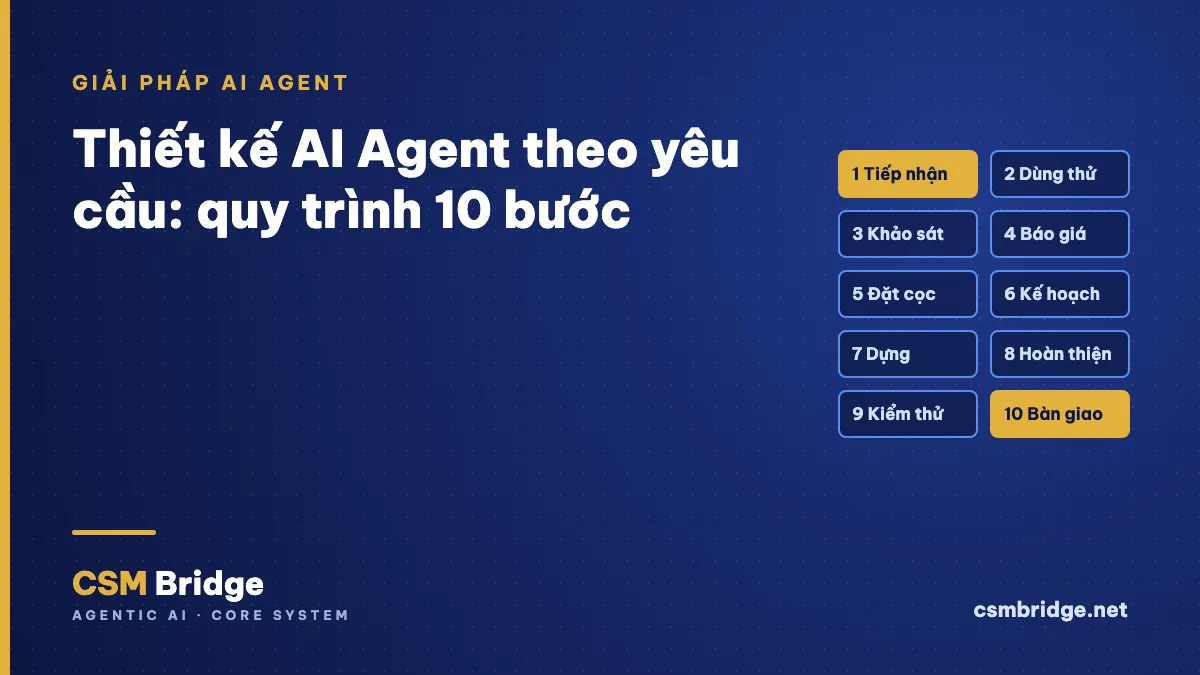
The custom AI agent process: 10 steps, each with a gate
| Step | Main activity | What you receive |
|---|---|---|
| 1. Intake | Chat with the consulting assistant | Project code and a project lead |
| 2. Trial | Open a sample app for your industry | A trial account |
| 3. Discovery | Answer questions, send real forms and spreadsheets | A business profile to approve |
| 4. Quote | Priced on the approved scope | An itemised quote |
| 5. Deposit | Bank transfer with the project code | Project activated |
| 6. Planning | Split into stages, write criteria first | Plan and milestones |
| 7. Build | Menus, screens, formulas, reports | A draft to preview |
| 8. Refinement | The project lead reviews with you | Draft updated from feedback |
| 9. Testing | Independent multi-layer QA | A test report |
| 10. Handover | Release, training, acceptance | Software running for real |
No step is skipped. A step starts only when you have agreed to the result of the previous one.
Step 1: Intake
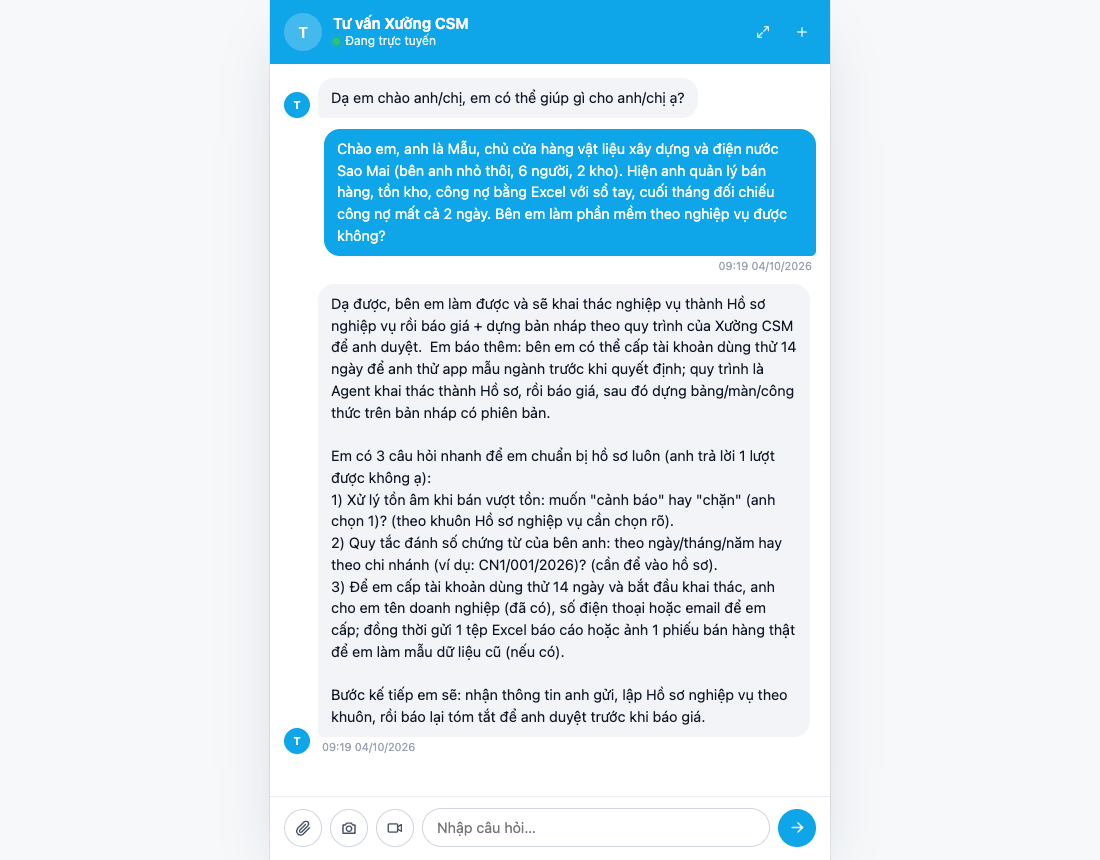
You message the consulting assistant on csmbridge.net, or via Zalo, Messenger or the contact form. It asks about your industry and which task costs you the most time. Everything is logged in the customer system with a summary of the chat. If you want to talk to a person, the assistant hands you over at once, and you never have to repeat yourself.
Example: the owner writes: "Month-end debt reconciliation takes two days. Can you build software for our workflow?" The assistant asks three questions back: should selling beyond stock warn or block, how are document numbers formatted, and could you send one real sales slip.
Step 2: Try a sample app for your industry
You get a trial account on the sample app closest to your industry. The temporary password must be changed at first login. A trial lets you point at what matches and what differs from your way of working, instead of describing it in words.
Step 3: Discovery into a business profile
This is the most important step. The assistant follows an industry-specific question set: documents, pricing, reports, permissions, print templates and legacy data. You send photos of real forms and the spreadsheets you use today. Every unclear point becomes an open question. The profile is locked only when all of them are answered.
Every money formula needs one numeric case that you confirm yourself. That case later becomes a test.
Example: "100 bags of cement × 88,000 VND wholesale, 2% discount, 10% VAT gives 9,486,400 VND. Correct?" The owner confirms. The sample profile has 16 business objects: 10 master lists (warehouses, items, customers, suppliers…) and 6 document types (purchase, sale, transfer, return, receipt, payment). It also holds 9 formulas, 18 confirmed numeric cases and 3 roles: owner, storekeeper, cashier. You read it back and click "Yes, this is my requirement".
Step 4: A quote on the exact scope
The quote is calculated from the approved profile, not guessed. Each item is listed: master lists, document types, money formulas, auto-calculated ledgers (stock card, receivables), reports and print templates, roles, external integrations and data migration. Large quotes, or profiles with too many uncertain points, are approved by the project lead in person. You know exactly what you are paying for.
Step 5: Deposit with your project code
The quote includes a QR code and transfer details. Transfer details are shown in the quote. The transfer description must contain the project code issued by the system, for example XC261004-47E3. This lets the system match the deposit to the right project wallet and activate the project automatically. The deposit rate and acceptance terms are stated in the quote. CSM Bridge does not accept money outside the system's payment gateway.
Step 6: Deep planning
A coordinating assistant, using a deep-reasoning AI model, splits the project into small stages. Each stage has data tables, screens, formulas, test cases and acceptance criteria written before building. The delivery date is fixed only after this step, never promised up front.
Example: the sample project has 7 stages: master lists and data migration; purchase slips; sales slips with A5 printing; transfers and returns; receipts, payments and debt; reports and gross margin; permissions and handover.
Step 7: Build menus, screens, formulas and reports
The software is built on a separate draft for your project, without touching live data. Menus, columns and three-language labels follow one standard template. Every declaration is checked at write time. Money formulas are checked against the numeric cases you confirmed in step 3.
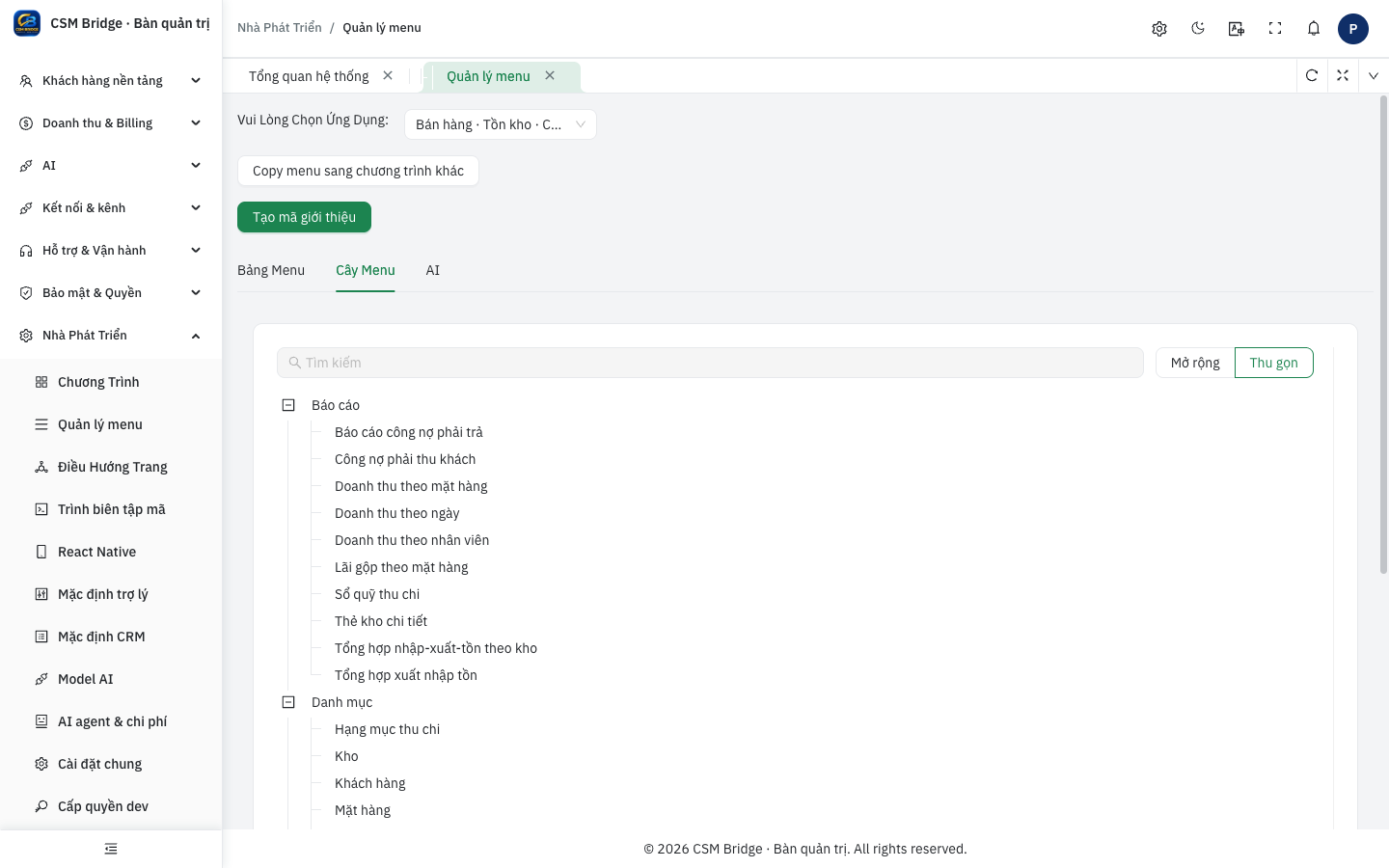
Example: the sample menu has Master lists, Documents and Reports. Reports include stock in–out–balance, detailed stock card, revenue by day, by item and by salesperson, gross margin, cash book, receivables and payables.
Step 8: Refinement with your project lead
The project lead reviews the draft, answers the questions the assistant is waiting on, and adjusts what needs a human decision. You preview it and give feedback. Every approval is traced: who approved, when and why. A good custom AI agent does not do everything alone. AI handles the repetitive work, and an accountable person decides what matters.
Step 9: Independent multi-layer testing
A separate QA assistant, with no permission to edit the draft, checks 6 layers:
- Template: every button and column follows the standard, labels exist in three languages.
- Formulas: every numeric case you confirmed, plus edge cases such as zero, rounding and month end.
- Ledgers and reports: QA recalculates independently and matches the app's reports to the last dong.
- Permissions: a cashier cannot see gross margin, a storekeeper cannot issue payments.
- Real interface: create, edit and delete on every screen in a real browser.
- Adversarial: wrong data types, numbers changed behind the interface, 10,000 rows of data.
If any layer fails, the report lists the exact error and sends it back to the right stage. Only a full pass leads to a release proposal.
Step 10: Handover and acceptance
The software is released to your live app, versioned and reversible. You get an account for each user, your opening data imported from Excel, and a user guide with real screenshots. You accept against the criteria written in step 6. After handover, every change request runs a small loop: discovery, supplementary quote, build, testing, release.
Why this process suits small and mid-sized businesses
- No guessing on your behalf. Every unclear point is asked before quoting.
- Money is right from day one. Each formula has a case you confirmed, re-tested before handover.
- Pay for the scope. The quote lists exactly what is in the profile you approved.
- One shared core. The AI assistant, chat channels and permissions already exist, so custom work focuses on your business.
Want the basics first? Read what is an AI agent, when you need your own industry AI assistant, AI agents automating multi-step workflows and connecting an AI agent to Messenger, Zalo OA and WhatsApp.
Frequently asked questions
I do not know how to write requirements. Is that a problem?
No documents needed. Just answer the consulting assistant's questions and send photos of forms and the spreadsheets you use. The business profile is drafted from that for you to read and approve.
How long until I get the software?
It depends on scope. The delivery date is set in the plan at step 6, once the profile is clear. CSM Bridge does not promise a date before there is a plan.
Can my old Excel data be migrated?
Yes. Data migration is an item in the profile and the quote. Row counts and total values after migration are reconciled against your original file.
How is the price calculated?
From the approved business profile: documents, formulas, reports, roles and integrations. Contact us for a quote that fits your needs.
Want a custom AI agent and software built around your workflow? Contact Le Anh – 0388.610.885, or message the consulting assistant on csmbridge.net to start at step 1.